

The short version
Over the past two months I built four real websites with AI, each on a different platform: WordPress, Sanity, Payload, and Astro with no CMS at all.
Three were rebuilds of sites that have been live for more than ten years. One is a new web app. Each has a real goal tied to leads and revenue, and my own marketing team has to work inside them.
I wanted to find out which platform works best when AI is doing most of the development work. My conclusion: AI has made the build fast on every platform, so the build is no longer what you should choose on. Choose on one question.
Who touches your website every week?
- A marketing team: you need a CMS they can use without calling a developer. For many marketers that is still WordPress, built cleanly. Sanity works if your content is very structured and you have a tech team behind it.
- Only you, and you are comfortable owning the setup: you may not need a CMS at all. A light Astro site, changed through code or AI, can be faster, cheaper to host and easier to secure, as long as the workflow and safeguards are in place.
- It is a web app, not a brochure: Payload.
For my own site, I still picked WordPress. Not the traditional setup with thirty plugins and a page builder. A clean build, with AI doing the heavy work and my team in control.
Here is the summary. The detail, the workflow and the back end of each follow.
| WordPress | Sanity | Astro, no CMS | Payload | |
|---|---|---|---|---|
| What I built on it | My personal site | A ten-year-old lead generation site | Another ten-year-old site | A website audit tool |
| Who can edit | The whole team logs in | Editors change words, not layouts | Changes go through code or AI | Editors use a built-in admin |
| Biggest strength | Everyone already knows it | Clean, flexible, hard to break | Fastest and cheapest to host in my test | Content, data and app in one place |
| Biggest catch | Needs looking after | The front end is a separate application | Needs a defined workflow and guardrails | You maintain it if you self-host |
| Best for | Marketing teams | Structured content with a tech team | One owner who is comfortable with the setup | Web apps |
Why did I run this test?
I have built websites for more than twenty years. I run a team of 30+ people, and we manage websites for some of Australia’s largest brands, universities, governments and major banks. WordPress has been our default for most of that time.
This year clients started asking a question I could not answer from experience: “Now that AI can build a website, what should we build it on?”
A website used to take my team weeks or months to build. Now, with AI, we can build one in days, sometimes in hours. The initial build is faster and cheaper than ever. So the expensive part has moved. It is now whether the build fits the business purpose, whether it helps you reach your goals, and how your marketing team works with it, and with AI agents, to keep it performing.
I had opinions on that. I did not have evidence. So I tested it on our own sites, where I could afford to get it wrong. No platform paid for a mention.
What were the rules?
- Real sites only. Three of the four have more than ten years of history, rankings and backlinks to protect. The fourth is a new tool.
- A real goal. Each one has a goal tied to leads and revenue.
- My marketing team has to work inside it. SEO, content, design and development. If they cannot use it, it fails.
- AI does the heavy work. All four were built with Claude Code. I gave direction and made the decisions. I did not write the code.
The workflow that was the same on all four builds
People ask which platform I used. The better question is how the AI was briefed, because that decided the quality of every site far more than the platform did.
This is the workflow, in order. It did not change between WordPress, Sanity, Astro and Payload.
1. Copy the old site first, and do not touch the live one
The first instruction on every build was the same: pull the existing site into a local copy, leave production alone, and write everything down. On the rebuilds that meant a full export of the old WordPress site: pages, posts, images, testimonials, redirects.
2. Collect the data before any design
Before a single page was designed, the AI pulled the history of each site: Google Search Console, Google Analytics, Ahrefs, Microsoft Clarity and our CRM. That became a dated baseline. Which pages bring traffic, which pages have backlinks, which keywords the site ranks for, and where enquiries come from.
One lesson I now apply everywhere: archive the raw data with the date on the day you pull it. A summary cannot answer “what ranked before” three months later.
3. Write the brief in plain words
Then I gave it context, mostly by voice:
- What the site is for, and what it should be known for.
- Who it is for, and who it is not for.
- What success looks like in 90 days and in six months, as a number of leads.
- What I do not want. This list matters as much as the wish list.
- Which content is protected. On two builds, recent articles written by my team were locked so the AI could not change a word of them.
4. Give the site a brain
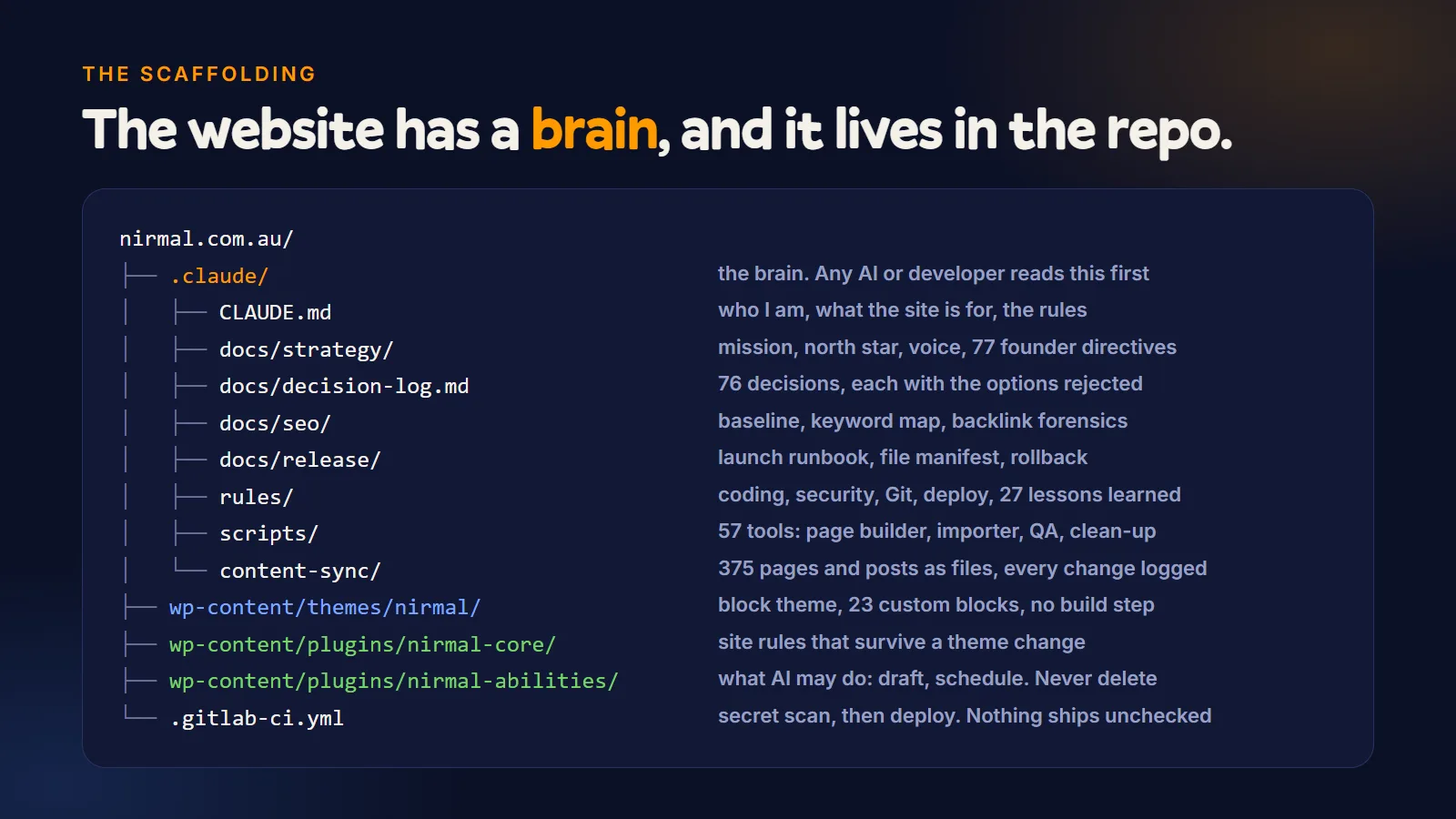
All of that lives in a folder inside the project, next to the code. I call it the site’s brain. It holds:
- A short briefing file the AI reads at the start of every session.
- A decision log: what was decided, why, and what was rejected.
- The rules for code, security, version control and deployment.
- A lessons file. Every mistake is written down with its fix, so it is not repeated.
- A work log for each day.
AI sessions forget. The folder does not. That is why I can pick up my phone, ask for a change, and get one that fits the site.
5. Run agents in separate lanes
For the bigger jobs I ran several AI agents at once, each with one lane: auditing every blog post, keyword research, checking backlinks, writing service pages. They share the same rules, and each logs what it did.
6. Design, then build
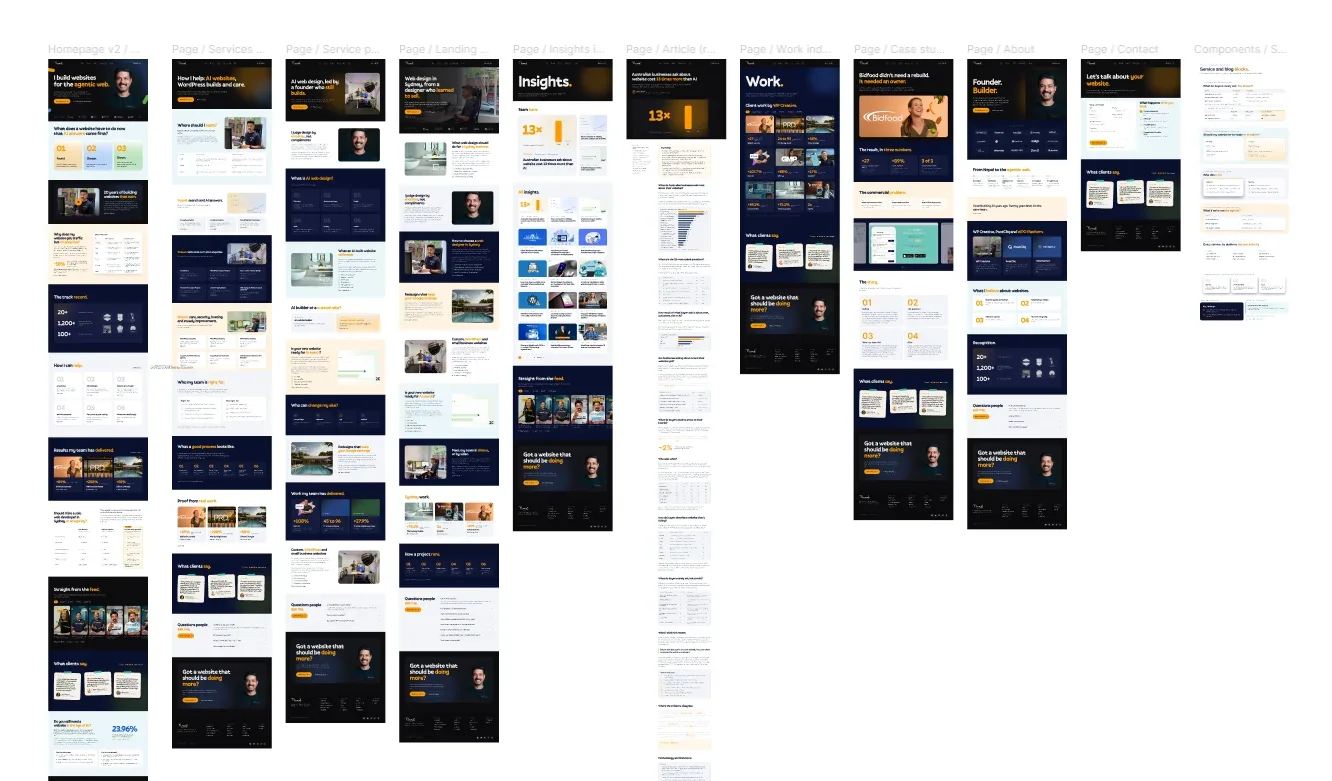
On my own site the AI designed the page templates in Figma from the brief, then built them. On the two older sites I kept the existing look on purpose and put the effort into structure, content and speed.
7. Automated checks before anything goes live
Every build has checks that run on every change. They fail the build if a page has a broken link or image, a missing or duplicate title, more than one main heading, invalid structured data, or a phrase on my banned list. A secret scanner runs before every commit.
8. A test link first, then a person approves
Every change goes to a private test address first. Nothing reaches the live site without a person approving it. On launch day a person checks every old address redirects in one hop, every form delivers, and tracking fires.
9. Measure every week
Each site has a weekly review that pulls the numbers again and compares them with the baseline.
That is the whole method. I covered the first build in more detail in how I rebuilt this site with AI. Without context you get a generic site on any platform. With it, the platform becomes a much smaller decision.
Build 1: WordPress
The site: this one. Fourteen years old, and ignored for about seven of them. I was embarrassed by it.
The stack: WordPress with a custom block theme, managed WordPress hosting, a content delivery network in front.
The workflow, step by step
- Local copy of the live site, plus the data baseline.
- An audit of every post. Thin and duplicate posts were merged into stronger guides, each redirected in one hop.
- The brief, then page templates designed in Figma by the AI.
- The templates built as a WordPress block theme, with no page builder.
- AI connected to WordPress through a controlled interface with restricted permissions.
- Checks before every commit, a staging copy, three independent reviews, then launch.
What changed
| Before | After | |
|---|---|---|
| Plugins | 29 | 8 |
| Theme code | 83,696 lines | 12,801 lines |
| Mobile speed score, homepage | 46 | 95 |
I wrote zero lines of that code.
What the back end looks like
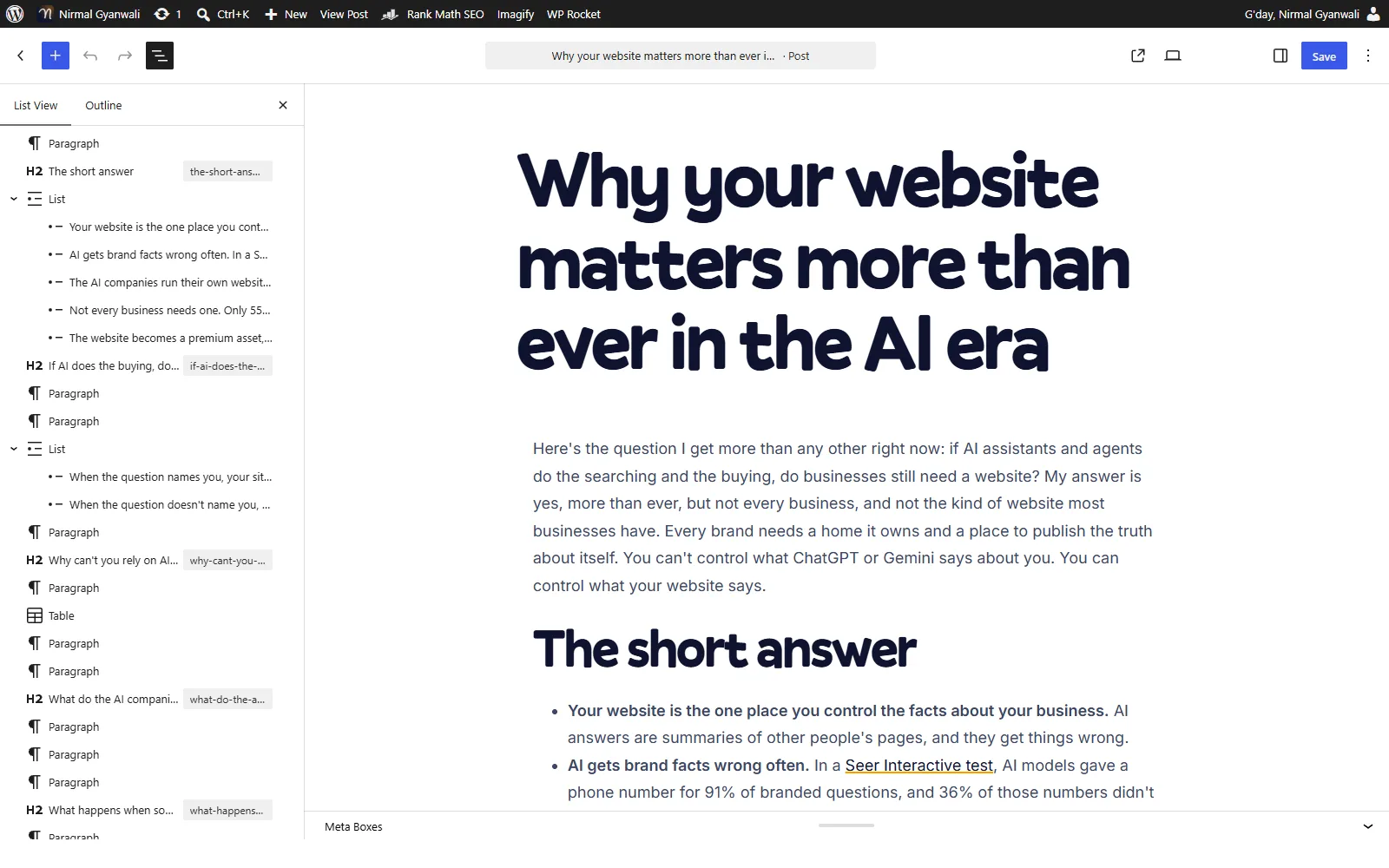
Everyone on my team already knows this screen. I can give a writer one level of access and a developer another. A new page, a new post or a changed headline needs no developer and no deployment. Nobody needs training.
AI works inside it too. It can draft a post for me. But I have restricted its permissions: it cannot publish or delete anything without approval. That means we can move fast while staying in control. I have also structured the site with SEO, AEO and AI agents in mind: server-rendered pages, structured data and a clear crawler policy.
The catch
WordPress needs looking after. Updates, security and plugins are ongoing work. Ignore it for a year and you increase the risk of security issues and things breaking. That is part of the real cost, and it is why WordPress management is a job, not a one-off.
Most of the bad WordPress sites I see are not bad because of WordPress. They are bad because of thirty plugins and a page builder nobody maintained.
Best for: a business with several people working on the site every week.
Build 2: Sanity
The site: a ten-year-old lead generation site my marketing team runs every day. It was on WordPress.
The stack: Sanity for content, Astro for the front end, hosted on Cloudflare. No WordPress in the new stack.
What is different about Sanity?
Sanity is a headless CMS. It manages the content, and nothing else. The pages your visitors see are built by a separate front end, in my case Astro, which reads the content from Sanity. In WordPress, the editor and the website are one system. Here they are two.
The workflow, step by step
- Export and freeze. The old WordPress content was exported and frozen as a baseline. That file is never regenerated, because a failing check must mean the content changed.
- Protect what the team wrote. 19 of the 37 articles were recent work by my team. Those were locked byte for byte: body, images, dates and links.
- Model the content. Each kind of page became a content type in Sanity: articles, service pages, the homepage, site pages, and the menu and footer. This is the real design work in a headless build.
- Build the front end in Astro, with every old article address preserved.
- Parity checks. Automated tests compare the new site against the frozen baseline. The last run built 119 pages, with more than 3,500 image and media checks and no failures.
- Publish and rebuild. When an editor publishes in Sanity, the site rebuilds on a test address.
- A review gate. A page reaches the live site only when it is published and marked ready. If an edit does not show, that status is the first thing to check.
- Launch, with the old site kept for parity checks and rollback.
What the back end looks like
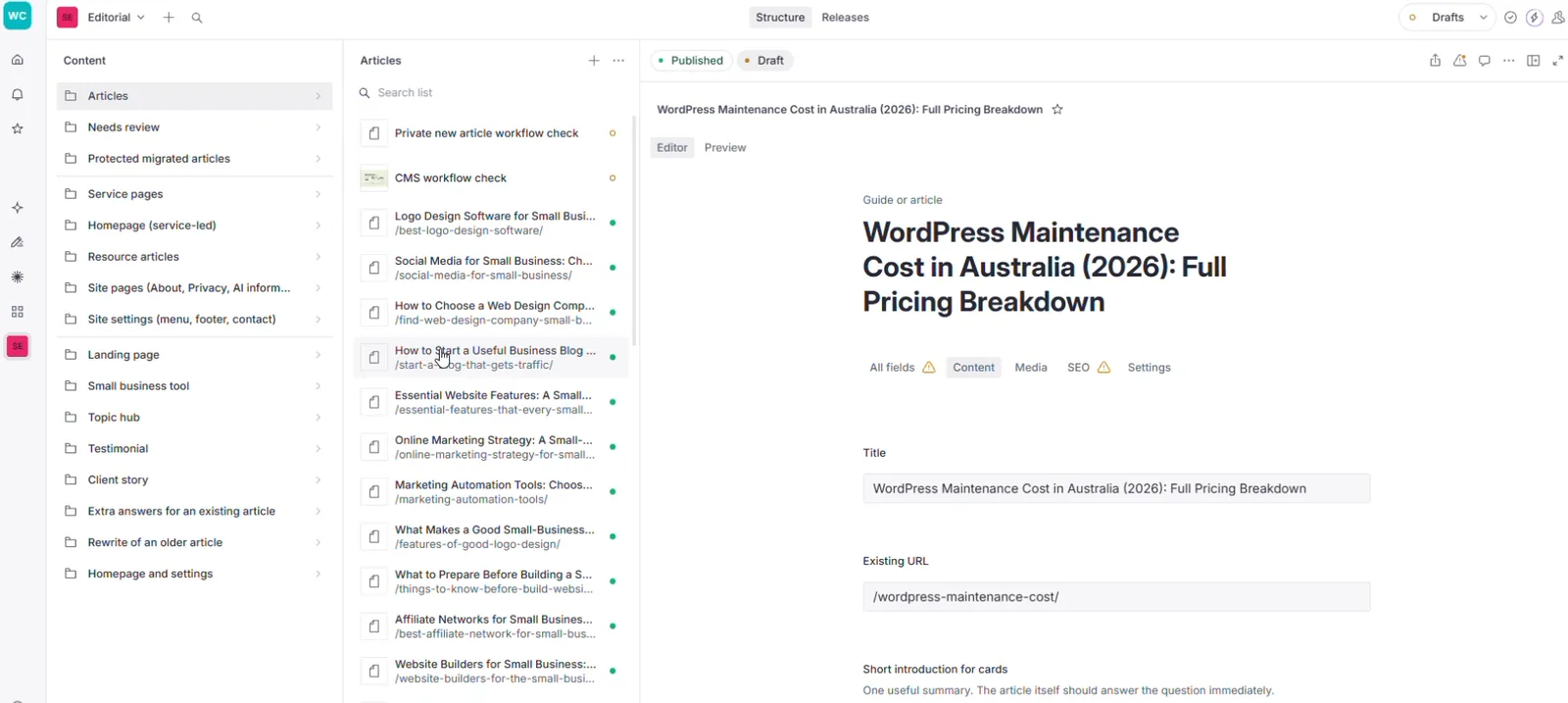
It is clean. Every page is simple and editable in the CMS: a headline field, a text field, a button label, an SEO tab. It is very hard for an editor to break the design, because the design is not in their hands. I wrote a one-page editor guide for the team, and that was enough to get them working.
The catch
Editors can change the words. They cannot create completely new page layouts. That needs a developer, or AI, every time.
Sanity manages the content, but your front end is a separate application. Someone still has to maintain the code, the dependencies and the deployment. AI can help with that, but you still need someone technical to manage the setup, not just during the build but on an ongoing basis.
The separate architecture can reduce some security risks. It can also add complexity and ongoing costs, including a licence that is priced per editor on paid plans.
Best for: teams with very structured content and a tech team to manage the dev setup, workflow and ongoing fixes.
Build 3: Astro with no CMS
The site: another ten-year-old site of ours. It was on WordPress with a caching plugin, an SEO plugin and a forms plugin.
The stack: Astro, built to static pages and hosted on Cloudflare. No CMS, no login, no database.
The workflow, step by step
- Parse the old site. The WordPress export gave us 14 pages, 6 posts, 39 testimonials and more than 100 images.
- Turn content into data files. Each service page is one small file in the code: title, heading, sections, questions, related pages. One template renders all of them, so adding a page means adding one file.
- Keep old addresses working. Images keep their old addresses, and every retired page redirects in one hop.
- Quality checks in the build. The build fails on a broken link or image, a missing or duplicate title or description, the wrong number of main headings, invalid structured data, or banned phrases.
- Every change goes to a test address automatically. Going live is a manual step with an approval.
- Measure speed before the switch. Once the address points to the new site, you cannot easily test the old one. I learnt that the hard way.
What changed
| Before (WordPress) | After (Astro) | |
|---|---|---|
| Homepage weight | 964 KB | 199 KB |
| Mobile performance (Lighthouse) | 90 | 98 |
| Accessibility score | 80 | 100 |
It is the fastest of the four. And with no CMS login or database exposed to visitors, there is a much smaller attack surface.
What the “back end” looks like
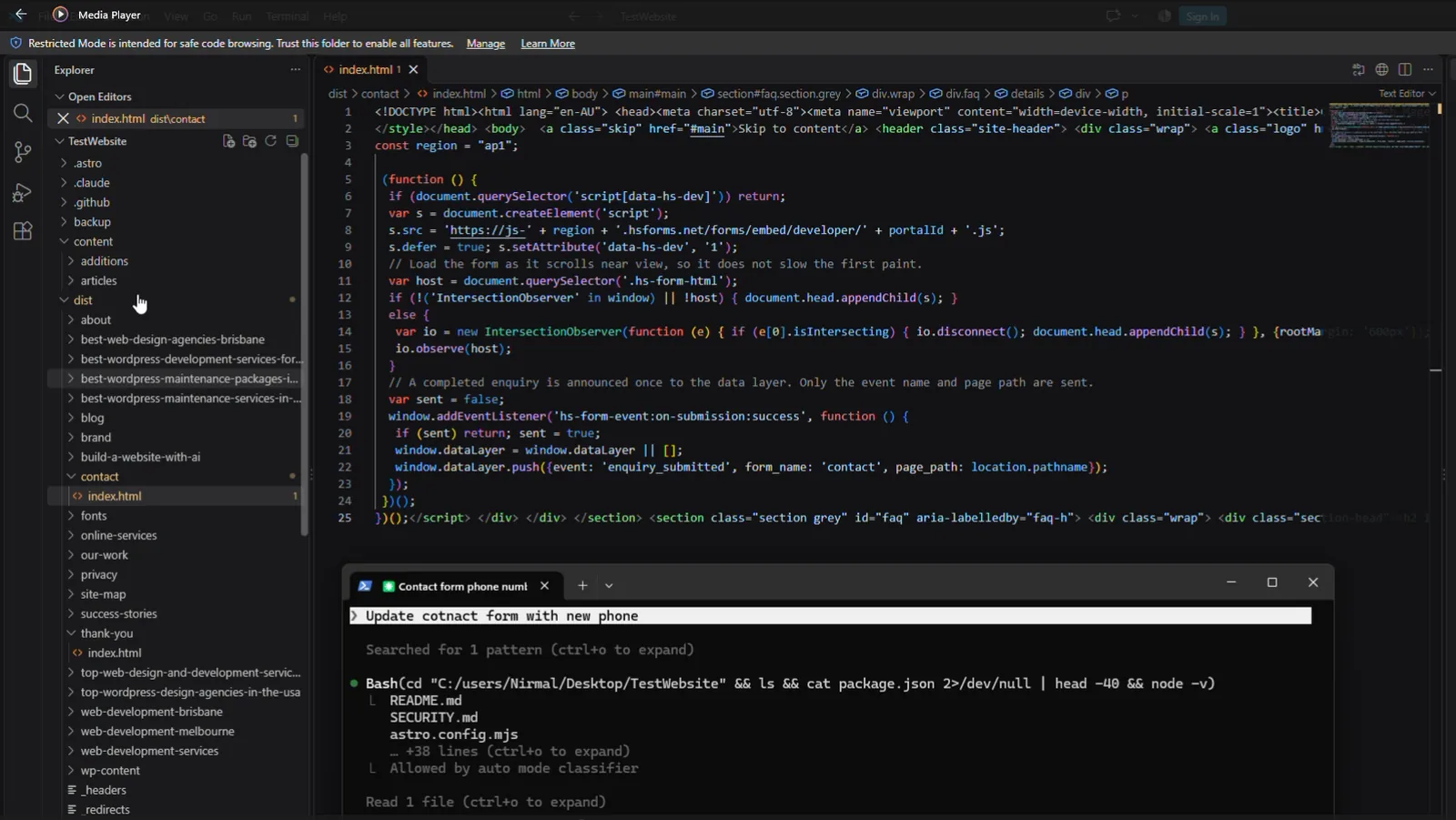
There is no back end. So how does my team change a headline? They ask AI, in plain English. AI makes the change, the checks run, and once everything passes, it goes live.
The fastest site I built is the one my marketing team cannot edit. Not the old way, anyway.
The catch
You need to define the workflow, the versioning and the deployment, so the team can follow the process. It can get a bit technical. And things can go wrong if the team does not know the setup and you do not put guardrails in place before production.
Best for: one owner who manages the site themselves and is comfortable with the whole setup. In my test it was the fastest and the cheapest to host, with the fewest moving parts to maintain.
Build 4: Payload
The site: a free website audit tool. We have been using it internally to audit websites, and we are now releasing it to the public. You enter a website and it shows where the site is losing people after the click.
This is not a brochure site. It is a web app. It needs a database, logic, and a place to manage users and content, all in one.
What is Payload?
Payload is an open-source CMS built for the same technology many modern web apps use: TypeScript, Next.js and a standard database. The difference from Sanity is where it sits. Sanity is a service you connect to. Payload runs inside your own application.
Why I chose it for this build
I first leaned towards Sanity for this project. I changed my mind once the app existed, for four reasons:
- It runs inside the app, not beside it. One codebase, one deployment. The marketing pages read content straight from the database, with no separate content service in between.
- It uses the stack the app was already built on. Next.js on the front, a Postgres database behind it.
- It is open source and self-hosted. No licence per editor as the team grows, and no dependence on a vendor’s pricing for a product I intend to own.
- It is a pattern my team can reuse on other projects.
How it is set up
- One application does three jobs: the marketing site, the signed-in product and the content admin.
- Payload is content only. It edits the marketing pages, articles and landing pages. Everything about users and reports lives in the app itself. I tried putting operations screens inside the CMS first, and it turned one admin into two products. Splitting them was the right call.
- One sign-in for the product and the CMS, so editors do not manage two sets of passwords.
- Content has its own area in the same database, kept apart from the application data, with an automated test that confirms the CMS has not created anything outside it.
- The version is pinned, so an upgrade is a deliberate decision, not a surprise.
- The admin is styled to match the product, so editors do not feel they have left it.
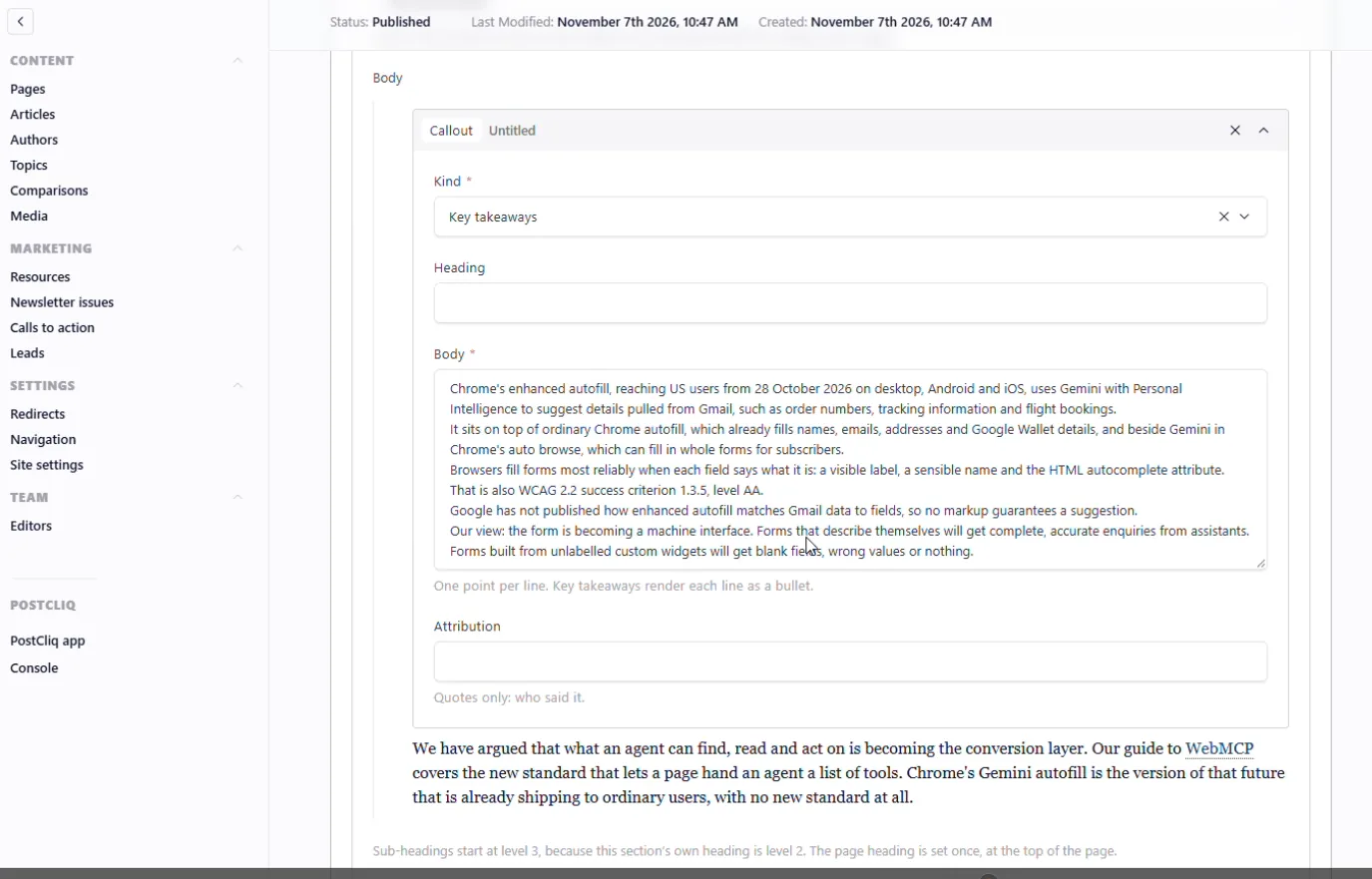
For an editor, it feels closer to WordPress than Sanity does. There is an admin area, collections of content, and a custom fields setup that anyone who has used WordPress will recognise.
Payload compared with WordPress and Sanity
| WordPress | Sanity | Payload | |
|---|---|---|---|
| Where the CMS runs | Same system as the website | A hosted service, separate from the website | Inside your own application |
| Front end | Built in (themes) | Separate, you build it | The same Next.js app |
| Custom fields | Through the block editor or plugins | Defined in code | Defined in code, similar feel to WordPress |
| Hosting | Managed WordPress hosting | Sanity hosts the content, you host the front end | You host all of it, if self-hosted |
| Licence | Open source | Priced per editor on paid plans | Open source |
| Who maintains it | You or your agency: updates, plugins, security | Sanity maintains the CMS, you maintain the front end | You maintain the application, database and infrastructure |
| Suits | Marketing websites | Structured content across many pages or channels | Web apps and products |
The catch
Could you use Payload for a normal marketing website? Absolutely. But for most marketing teams, I would question whether they need that level of complexity.
And if you self-host it, you are responsible for maintaining the application, the database and the infrastructure: backups, upgrades and security.
Best for: web apps. Logins, a database, a tool people use.
All four, side by side
| WordPress | Sanity + Astro | Astro, no CMS | Payload + Next.js | |
|---|---|---|---|---|
| Type | Traditional CMS | Headless CMS | Static site, no CMS | CMS inside a web app |
| Who edits content | Anyone with a login | Editors, in the Studio | Whoever can use code or AI | Editors, in the admin |
| Create a new page layout | Editor, with blocks | Developer or AI | Developer or AI | Developer or AI |
| Where content lives | Its own database | Sanity’s hosted content store | Files in the code | Your own database |
| Speed in my builds | Good when built lean (46 to 95) | Very fast | Fastest (964 KB to 199 KB) | Very fast |
| Security surface | Login, database and plugins to protect | Content kept apart from the site | No login or database exposed | Your app, your responsibility |
| Ongoing care | Updates, security, plugins | Front end code, dependencies, deployment | Workflow, versioning, deployment | Application, database, infrastructure |
| Cost shape | Hosting plus maintenance | Licence per editor plus front end care | Lowest hosting in my test | Hosting plus your own upkeep |
| How AI works with it | Drafts inside the CMS with restricted permissions | Builds and maintains the front end | Makes every change through code | Builds and maintains the app |
| Ecosystem | The largest, with the biggest community | Growing, developer focused | Growing, developer focused | Growing, developer focused |
| Best for | Marketing teams | Structured content, tech team behind it | One owner comfortable with the setup | Web apps |
What does a normal week look like on each?
This is the table I wish someone had shown me. The build is a one-off. These jobs come up every week.
| The job | WordPress | Sanity | Astro, no CMS | Payload |
|---|---|---|---|---|
| Fix a typo or change a headline | Editor, two minutes | Editor, then the site rebuilds | Ask AI, checks run, goes live | Editor |
| Publish an article | Editor | Editor | Ask AI or add a file | Editor |
| Launch a new campaign landing page | Editor, from existing blocks | Editor, if a suitable layout exists | Ask AI | Editor, if a suitable layout exists |
| Create a new kind of page | Developer or AI | Developer or AI | Developer or AI | Developer or AI |
| Something breaks mid-campaign | Many people know how to fix it | Needs your tech team | Needs whoever owns the setup | Needs your tech team |
Look at the last row. For a marketing team on a deadline, that row matters more than any speed score.
So which one should you choose?
Ask who touches your website every week.
If the answer is a marketing team, a writer, an SEO person and a designer all logging in, you need a CMS they can use without calling a developer. It has to be easy to manage when something goes wrong mid-campaign or you are on a tight deadline. For many marketers, that is still WordPress. It is the most popular CMS, with a big ecosystem and a community behind it, and most marketers already know it.
Sanity works if your content is very structured, and you have a tech team to manage your dev setup, workflow and ongoing fixes.
If you are the only one managing the site, and you are comfortable owning the whole setup, you may not need a CMS at all. Build it light, with no dashboard, and use AI to help you make changes. A simple static site can be faster, cheaper to host and easier to secure. But only if you have the right workflow and safeguards in place.
If you are building a web app, use something built for that.
Five questions to settle it:
- How many people need to change the website, and how often?
- Can they wait for a developer, or do they need to publish today?
- Who fixes it when something breaks mid-campaign?
- Is it a marketing website, or a product people sign in to?
- Who will keep it updated and secure in two years?
If you are weighing a wider field, my guide to choosing the best CMS for your website covers the other options.
After all four, I still picked WordPress for my own site. But not the traditional WordPress setup and workflow. Not thirty plugins and a page builder. A clean build, with AI doing the heavy work and my team in control.
AI did not kill WordPress. It killed the bad way of building it.
So do not start with the platform. Start with the goal, and the people accountable for that goal. The website has to help them move faster day to day, while keeping the long-term goal in sight.
What did not change, on any platform?
- Context beats platform. The quality of the brief decided the quality of every site.
- Migrations are still the risk. Addresses, redirects, forms and tracking need a person to check them on launch day, whatever the platform.
- Every platform needs looking after. WordPress has plugins to update. Sanity and Payload have front end code and dependencies. Even a site with no CMS has a build to keep current.
- Someone still has to own it. AI builds fast. It does not notice that enquiries stopped arriving.
It is also too early for results. These builds are new. I will report back on traffic and leads at 90 days.
Questions people ask me about this
Is WordPress dead now that AI can build websites?
No. AI works very well with WordPress, because it is the most documented CMS there is. What is dying is the heavy way of building it: dozens of plugins and a page builder on top.
Which CMS is best for a marketing team?
One the team can use without a developer, and that someone can fix quickly when a campaign is live. For many teams that is WordPress. Sanity suits teams with structured content and technical support.
What is a headless CMS, and do I need one?
A headless CMS manages content only. A separate front end builds the pages. You need one if the same content feeds many pages or channels, or if you have a tech team that wants full control of the front end. If you run one marketing website, you may not.
Can a marketing team use Sanity without a developer?
For editing existing pages, yes. For completely new layouts, no. And someone technical has to look after the front end on an ongoing basis.
Is Payload better than WordPress?
For a web app, yes, because the content sits inside the application. For a normal marketing website, it is usually more than a team needs, and you maintain it yourself if you self-host.
Do I need a CMS at all?
Only if people other than a developer need to change the site regularly. If you manage it alone and are comfortable with the setup, a site with no CMS and AI-assisted changes can work well.
Is a website with no CMS good for SEO?
It can be excellent, because the pages are light and fast. But speed alone does not rank a site. Content, links and a careful migration still decide it.
Which platform is cheapest to run?
In my test, the site with no CMS was the cheapest to host, because there is no database or dashboard to run and patch. The trade-off is that every change goes through code or AI.
Can AI build a website on any of these?
Yes. I built all four with Claude Code. The difference between a generic result and a good one was the context I gave it, not the platform.
Should I rebuild my website at all?
Not always. If the platform is still supported and your team can use it, improving what you have is often the safer choice. A rebuild is a migration, and a migration is a risk to everything that already works.
If you are planning a rebuild
Start with the goal and the people accountable for it, not the platform. Write down who works on the site, how often, and what they need to do without help. The platform choice usually becomes obvious.
If you want a second opinion, book a free call and tell me your biggest challenge with your website right now. I will share my thoughts and point you in the right direction.