
Everyone agrees on two things about AI and websites.
1/ whatever AI builds looks like slop.
2/ a proper website still takes a team weeks.
I’ve spent 20 years building websites, and I believed both.
Then I rebuilt my own neglected website with AI, and found out which belief was true. The first one is, but only when nobody gives the AI context.
It took a couple of weeks of early mornings, starting at 3:30 am in an empty office with Wispr Flow and Claude. I talked. Claude Code did the work. I wrote 0 lines of code. My part was the part AI can’t do on its own: the data, the context, the taste and the final yes.
The result wasn’t just faster. It was better. Every page and post was checked against real search data for what was working and what wasn’t. 150 weak posts were merged into stronger ones. The code is a fraction of what it was, the design finally looks like me, every old link is accounted for, and every change was tested before it went live. Better content, better code, better design. That’s the difference AI makes when someone who knows the work is directing it.
Meanwhile my YouTube feed keeps serving me the same thumbnail. A man with his mouth open, a red arrow, and the words “I fired my marketing team and replaced them with AI.” Sometimes it’s the designer. Sometimes it’s “my whole agency”. I always want to ask one question: what business?
I didn’t fire anyone. My team at WP Creative was busy with client work, which is the point of having a team. This is how to build a website with AI without the slop, shown on my own site: the scaffolding, the screenshots, the numbers, and the things that went wrong. I’m sharing almost everything, because the only honest answer to “can AI build a good website?” is to show one.
The short version
- What I used: Claude Code (Anthropic’s coding agent), Figma, WordPress 7.1, a custom block theme, the WordPress MCP Adapter, Local, Git, WP Engine and Cloudflare. I talked through Wispr Flow instead of typing.
- The approach: data first. Search Console, Analytics, Ahrefs and our CRM showed the AI what was working and what wasn’t before anything was designed or rewritten. It took a couple of weeks of early mornings, and the AI did much of the heavy analysis overnight while I did my actual job.
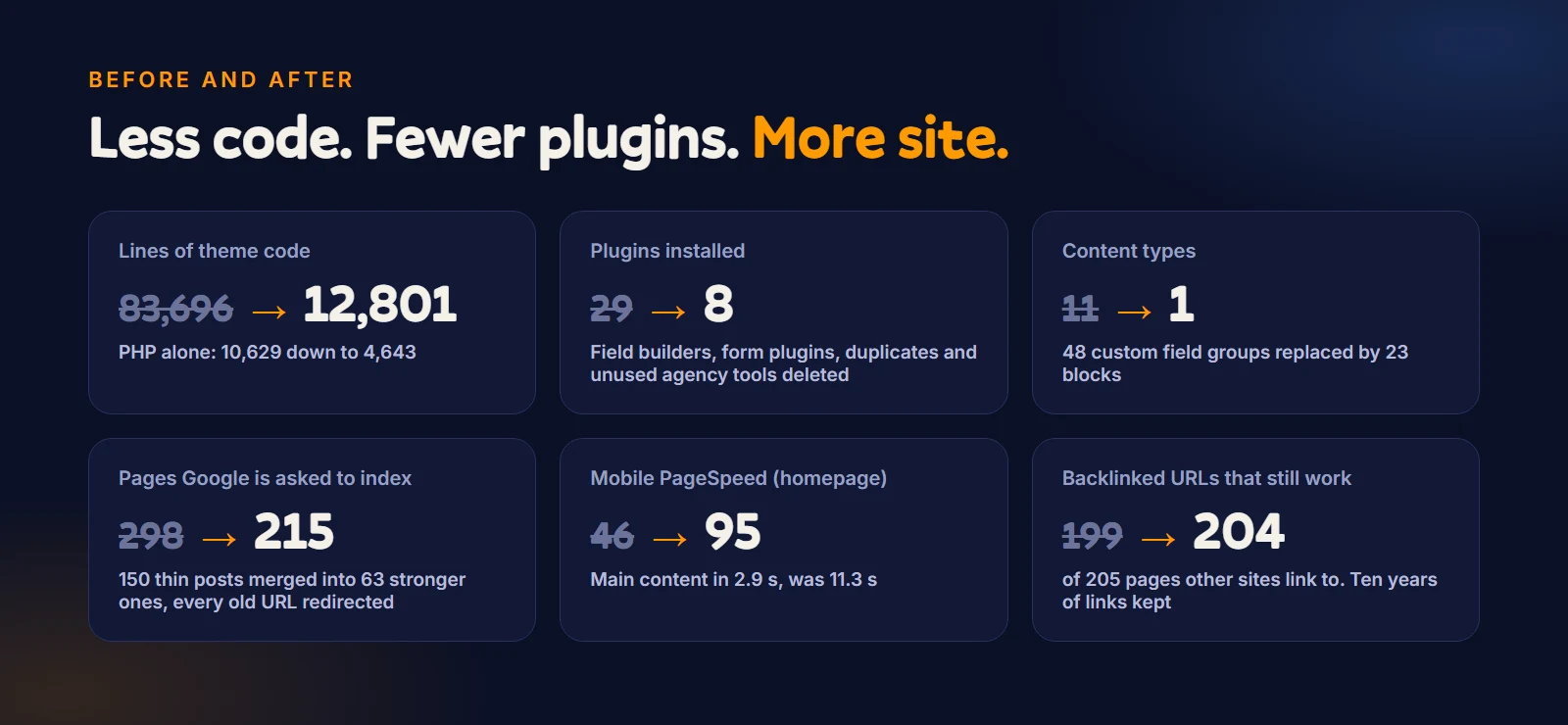
- The result: theme code down from 83,696 lines to 12,801. Plugins installed down from 29 to 8. Eleven content types down to one. 150 thin posts merged into 63 stronger ones, and 204 of the 205 pages other sites link to still working. The homepage on a phone went from 46 to 95 on PageSpeed, and it scores 100 on desktop.
- What it is not: a site that looks like every other AI website. A human (me) set the taste, rejected work and approved every page. More on that below, because it’s the whole difference.
- What still needs you: judgement, history, taste and the final yes. AI did the work. It didn’t decide what the work was for.
Why was my own website neglected?
Because I was busy building a business, and the website that built that business became the one nobody looked after.
This domain was my first real shopfront. When I started out on my own, nirmal.com.au was how clients found me. Then the agency grew, we rebranded to WP Creative, and all of our energy went there. My own site got parked. It sat there for years: a 2019 theme, the old studio branding, and a page builder holding everything together with custom fields.
I felt guilty about it every time someone looked me up. I build websites for a living. My own site didn’t reflect me, my thinking or what I build now. But redoing it properly means design, data, content, redirects, testing. That’s weeks of a team’s time, and my team had paying work to do. So I kept not doing it.
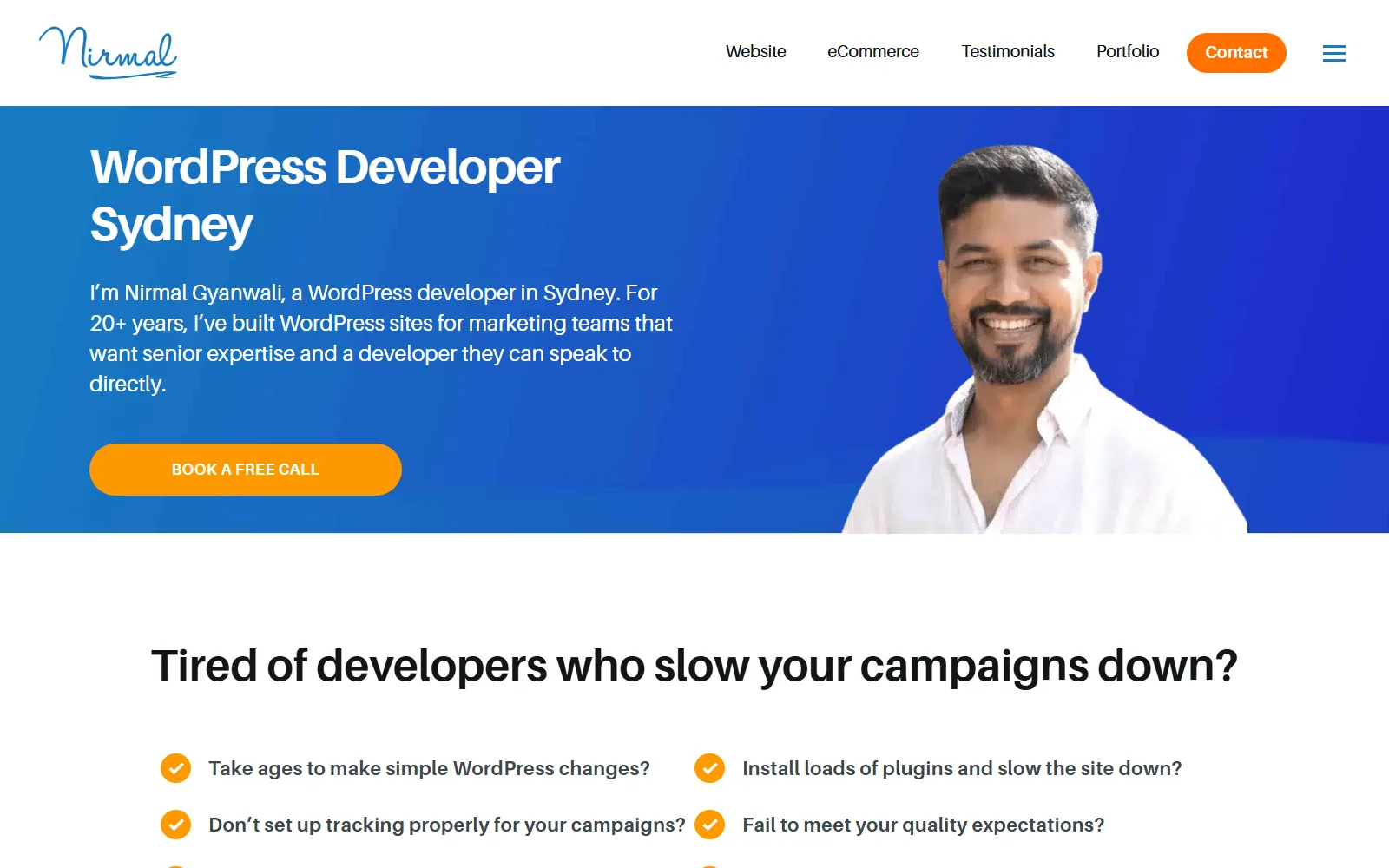
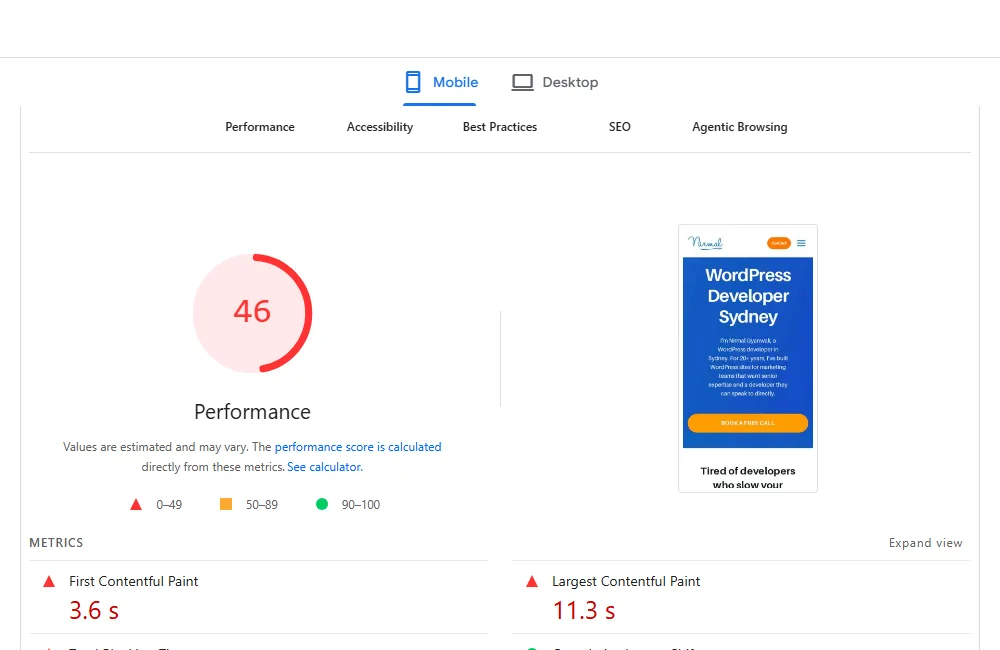
When I finally ran the numbers, they were worse than the guilt:
- On a phone, the old homepage took 11 to 12 seconds to show its main content. Across ten key pages the mobile PageSpeed score averaged 45 out of 100, and the slowest page took 17 seconds. Google’s “good” is under 2.5.
- Real Google clicks had dropped sharply since June. (Ahrefs estimated far more traffic than Search Console showed, which is a lesson on its own: use Search Console for clicks.)
- The authority wasn’t clear, and the content was tired. Google couldn’t easily tell whose site this was or what I was the expert on. Many old articles were outdated, very long, and slow to get to a clear answer.
How did it start?
At 3:30 am, with a voice note.
I don’t type long instructions. I talk, and Wispr Flow turns it into text. The first instruction was roughly: “Pull the live site into a local copy. Don’t touch production. Download the data from Search Console, Analytics, Ahrefs and HubSpot. Follow WP Creative’s own development process. Write everything down.”
That last sentence turned out to matter more than any other.
What happens when you give AI no direction?
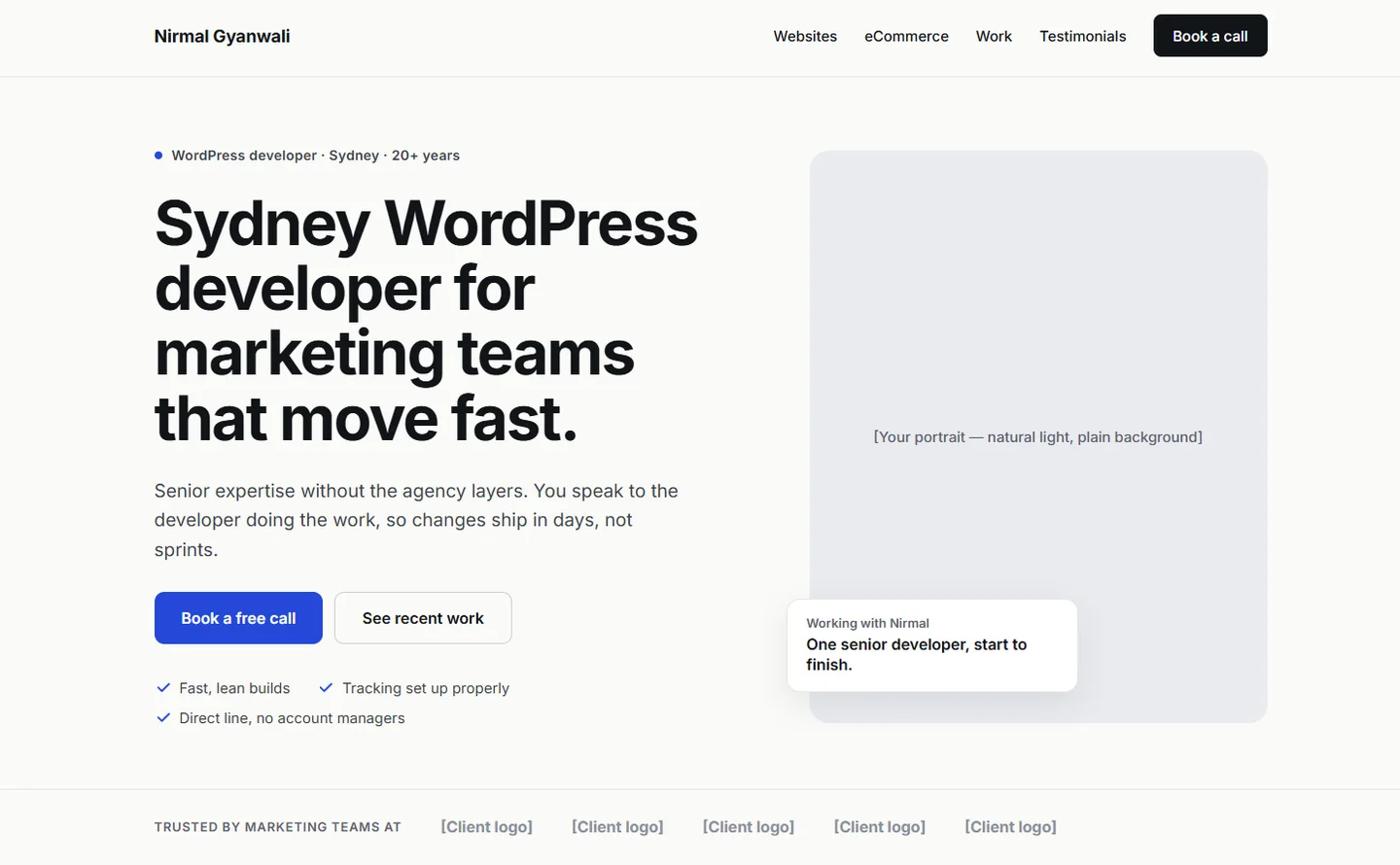
I tested it the way most people use AI, on purpose. On the first day I asked Claude to design my homepage with almost no context: who I am, what I do, build me a homepage. This is what came back.
So I added one instruction: I’d like a dark background. That was all the context it got.
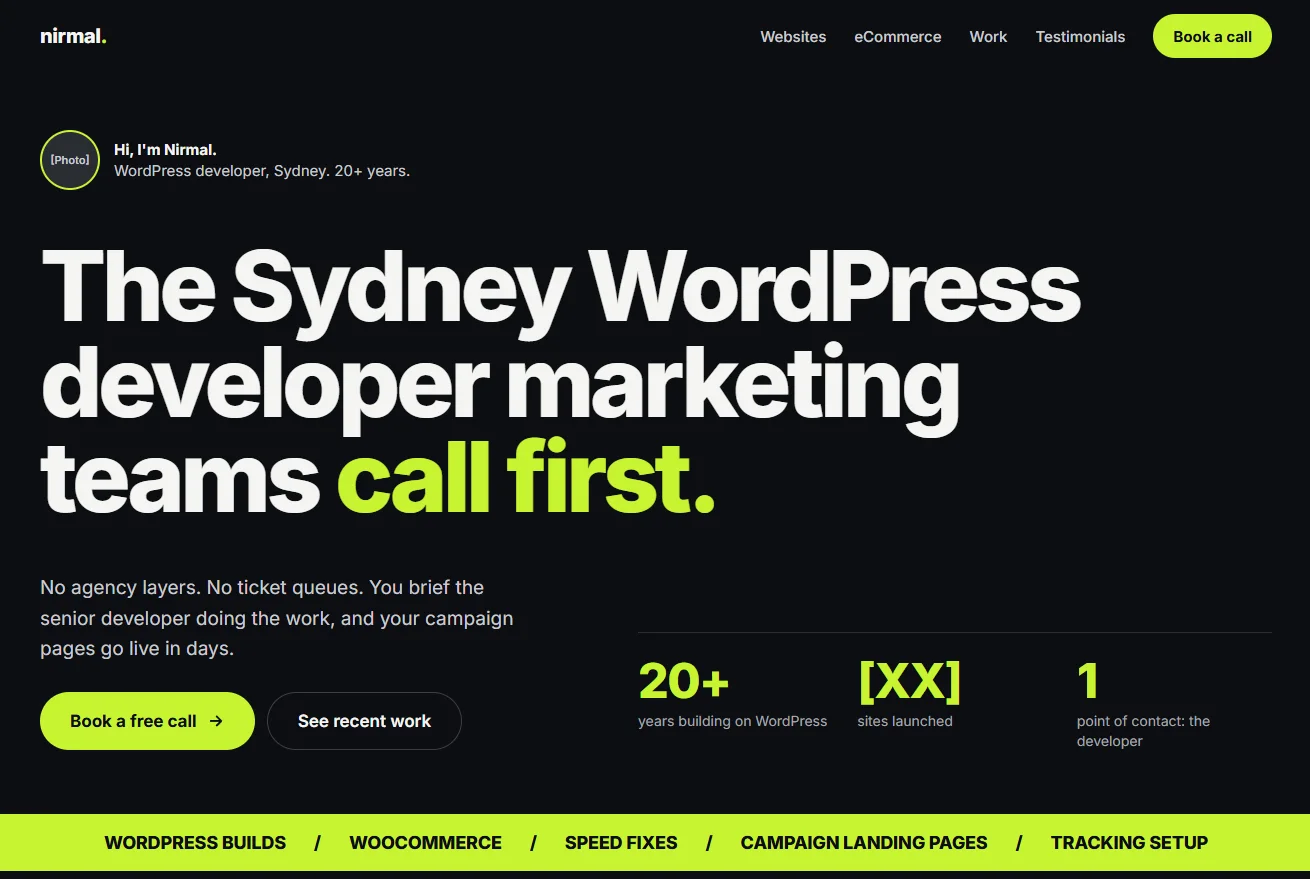
Then I went a little deeper. Add my photo. Align it with my brand. The trouble was that this brand had no written guidelines yet: no colours that meant anything, no fonts, no rules. So Claude guessed.
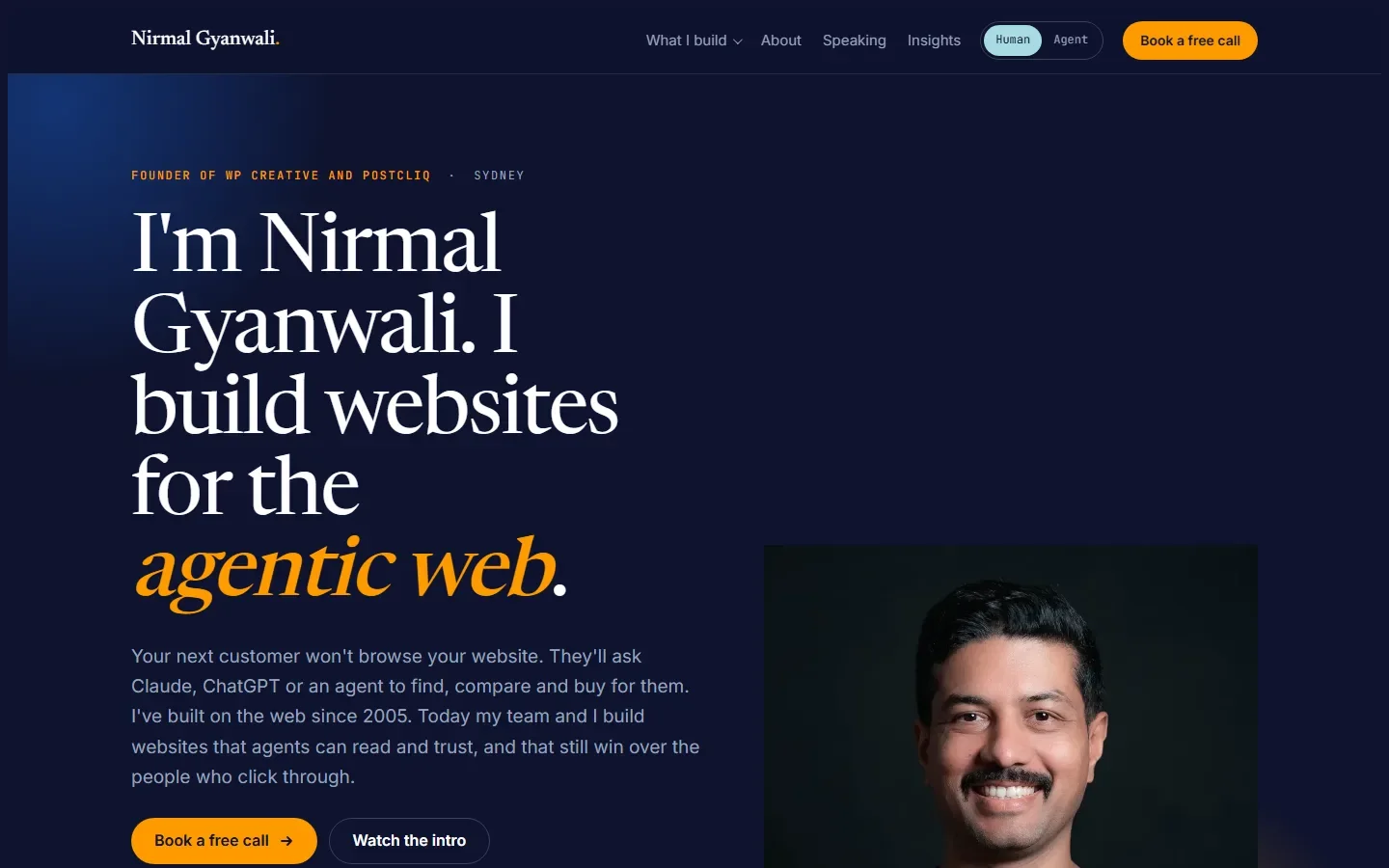
None of these are broken. That’s the trap. They load, they read fine and the buttons work. And they’re exactly what I see on so many sites built with AI, because this is how most people use it: a short prompt and hope. AI isn’t bad at design. Without direction, it gives you the average of the internet.
So I stopped asking for a homepage and started giving context. The brand ethos and the mission. What I want to be known for. What each colour stands for. How the site should sit beside WP Creative without looking like WP Creative. The impression it should leave. The sites I liked and why, and the things I didn’t, starting with the serif fonts AI reaches for first.
And I didn’t ask Claude to design it straight into code. I asked it to work the way a professional designer would, in a professional tool. I gave it a Figma account with Figma AI credits and the full brief. I didn’t touch Figma. I talked, and Claude went into Figma and designed every page, using Figma’s own AI and layout tools to get the structure right.
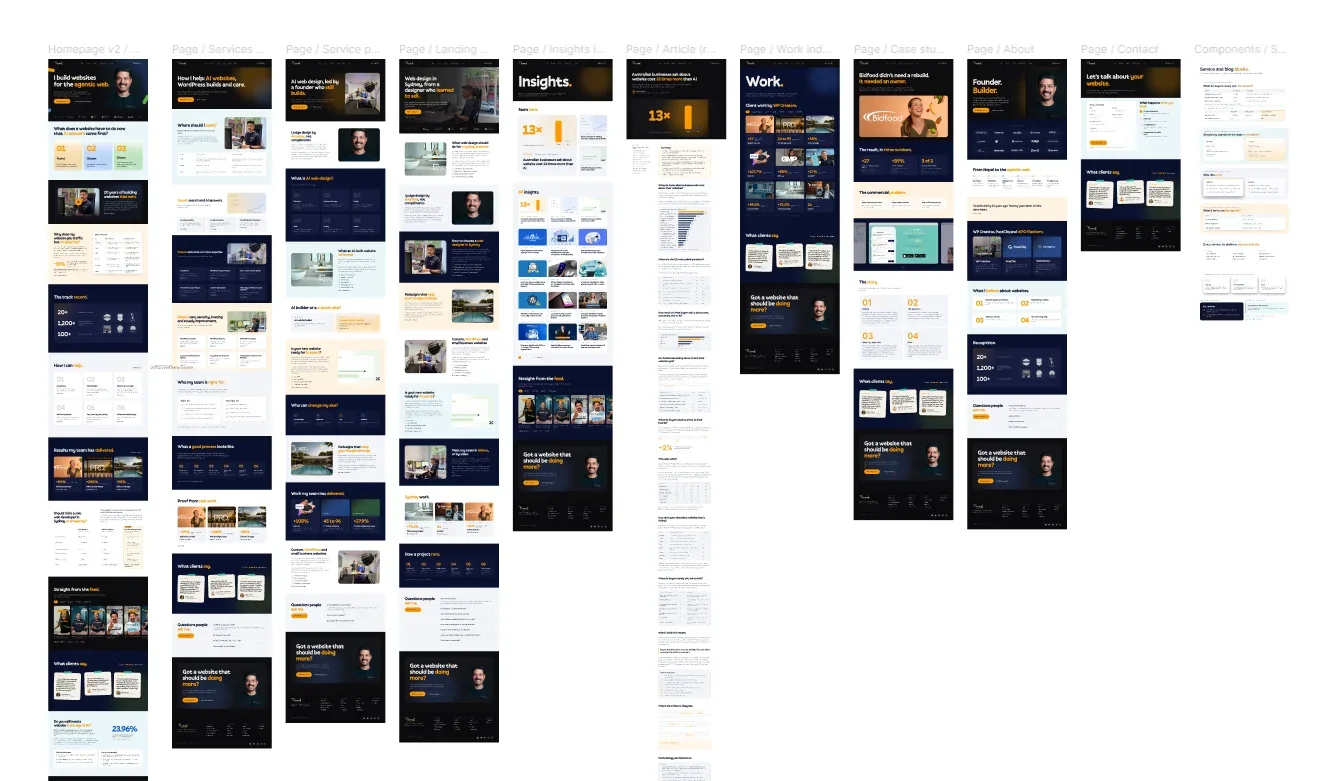
That changed everything downstream. Figma had already done the hard design work, so the build could be close to pixel perfect. Claude built it as a WordPress block theme with precise instructions: these fonts, these colours, these rules, nothing extra.
The build followed the same process my team uses on client sites. Every change sits on its own Git branch. Our GitLab CI/CD pipeline scans for leaked secrets, checks PHP compatibility and code quality, deploys to a staging copy, runs a security scan against staging, and only goes to production when a person approves it. This site’s pipeline was still being switched on at launch, so the release went through a staging copy first, with a secret scan on every commit.

Same AI. Same person asking. The only thing that changed was the context. That’s the whole argument of this post.
The scaffolding: the website has a brain
Most people think AI building a website means typing “make me a website” into a box. That’s how you get AI slop. What actually works is boring and structural: before any code, you give the AI somewhere to keep its memory.
Every project at WP Creative already has a .claude folder, our agency’s standard. For this site it became the brain. A short briefing file (CLAUDE.md) that any AI or developer reads first. My mission and point of view. Every instruction I’ve given, numbered, so I never have to say anything twice (there are 104 of them now). A decision log with 96 entries, each one recording what was decided, why, and which options were rejected. Rules for code, security, Git and deployment. And a lessons file, where every mistake gets written down with the fix, so it doesn’t happen twice.
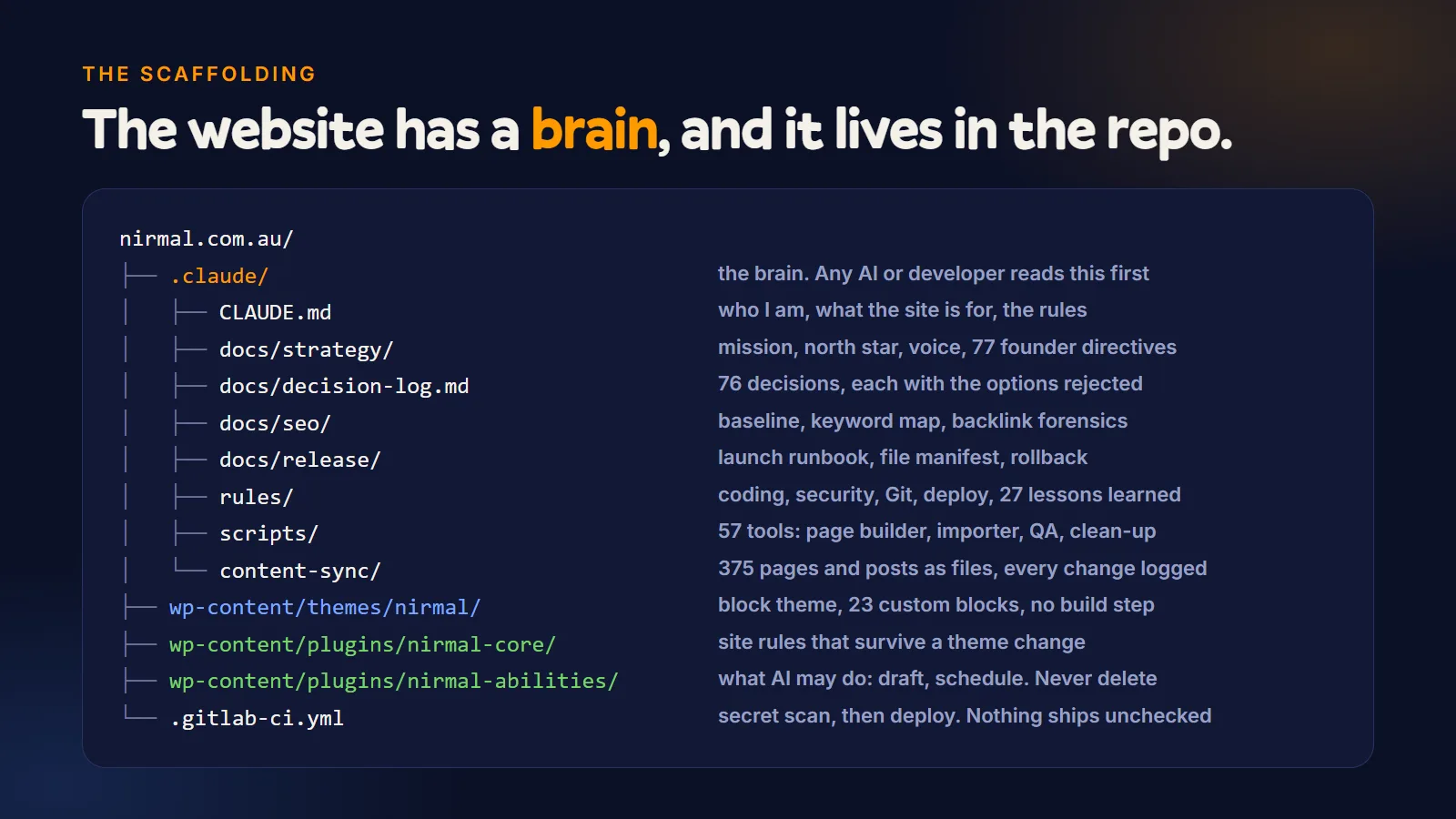
Why does this matter? Because AI sessions forget. Every new conversation starts blank. With the brain in the repository, the next session (human or AI) starts with the full context: what we’re building, what I care about, what we’ve already tried, and what broke last time. It’s the difference between a contractor who reads the job file and one who turns up and asks “so, what are we doing?”
How to build a website with AI: what I did, step by step
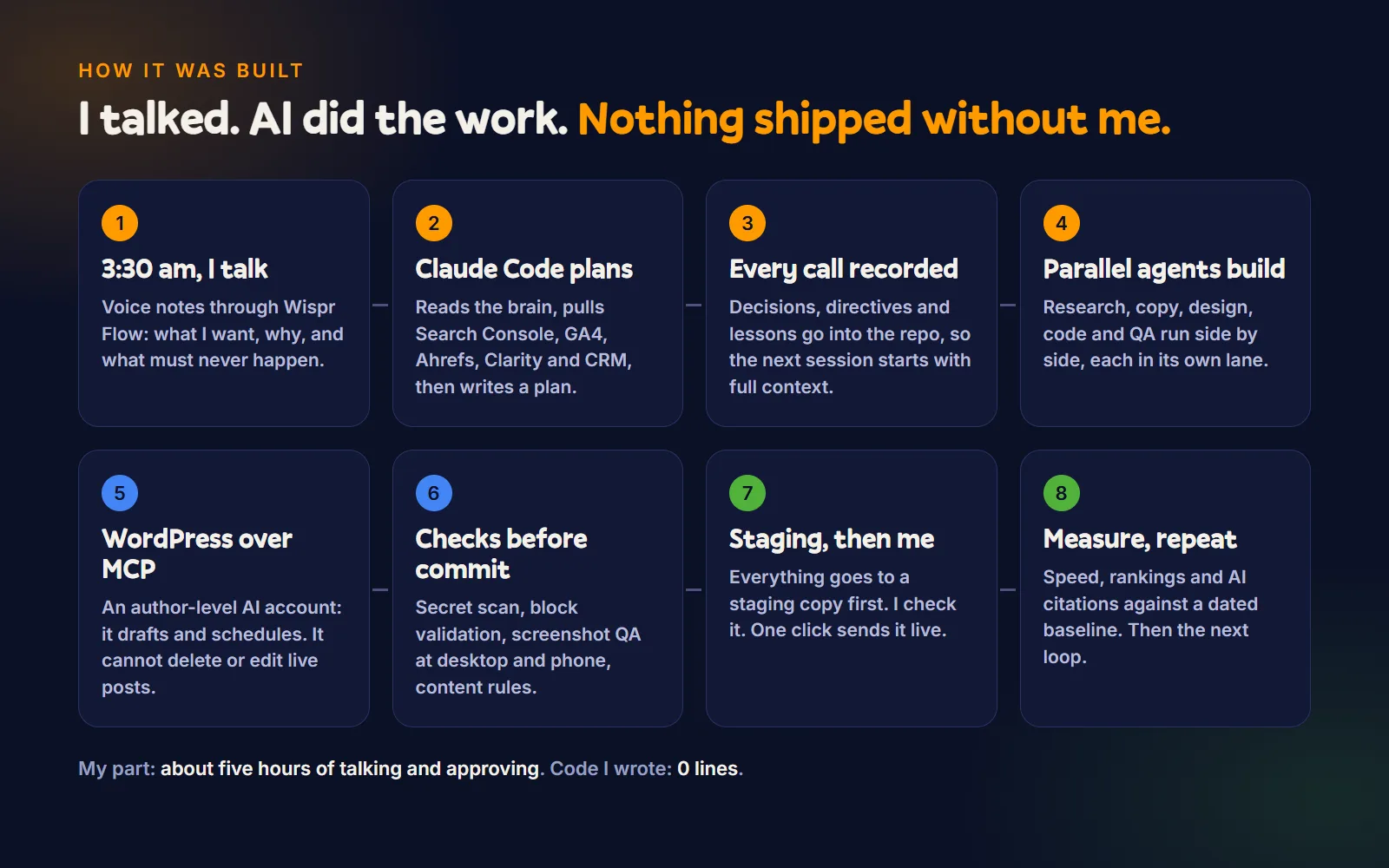
- Data before opinions. The first day was measurement, not design. Search Console, Analytics, Ahrefs, Microsoft Clarity and our CRM, pulled into a dated baseline. You can’t prove a rebuild worked if you didn’t write down where you started.
- Parallel agents, each in its own lane. At one point nine AI workers ran side by side: one auditing all 278 blog posts, one researching keywords, one checking backlinks, one writing service pages, one doing technical SEO. A shared operating manual kept them consistent.
- Everything as files, everything logged. Every page and post exists as a file in the repository. Every change is logged against its URL, so rankings can be compared before and after, page by page.
- A brief first, then Figma. I set the direction in words: dark navy, big type, my own photos, the accent colours from WP Creative, and what to avoid. Claude designed every page in Figma from that brief, then built it as a WordPress block theme.
- WordPress over MCP, with a leash. The AI talks to WordPress through the official MCP Adapter, using an author-level account. It can draft and schedule posts. It cannot delete anything or edit a live post. We tested that: a direct publish, an edit to a live post and a settings change were all refused.
- Checks before every commit. A secret scanner runs before anything is saved to Git. Screenshots of every page at desktop and phone width. Block validation. Content rules: no prices on service pages, no em dashes, Australian spelling.
- A staging copy, then me. Nothing goes live until I’ve looked at it.
What did the AI find that humans had missed?
This is the part that changed my mind about AI in our business.
- A post-ordering plugin had been quietly reordering every list of posts on the site for years. Nobody had asked it to. It was switched off.
- Ten years of links were hiding in old URLs. Ahrefs listed 205 addresses other sites link to. On the old site, six of them led to error pages. On the new one, 204 of 205 work. The last is an old advertising image nobody needs. One old address with 392 referring domains on record turned out to have only 2 live links left. The rest had died years ago. That kind of finding changes a decision, and the AI found it by checking instead of assuming.
- 150 blog posts were thin, dated or duplicated. They were merged into 63 stronger guides, each old address redirected in one hop to its closest match, never dumped on the homepage.
- Security loose ends, the kind every ten-year-old WordPress install collects. I’m not listing them here until production is clean, which is how you should treat security findings too.
The rebuild: less code, fewer plugins, more site
The old theme was a classic 2019 WordPress theme built with Gulp, a build tool that no longer installs on current Node. The content lived inside 48 groups of custom fields, which meant the editor showed a stack of form fields instead of a page. Eleven content types were registered by a plugin, in the database, where Git couldn’t see them.
The new theme is a block theme. Every page is real blocks you can see and edit. Testimonials and case studies live as versioned data in the theme. There’s one custom content type, registered in code.
Counting every line of theme code, including the two copies of Bootstrap the old theme carried, it went from 83,696 lines to 12,801. That’s nearly 71,000 lines gone. The PHP alone went from 10,629 lines to 4,643. On launch day, PageSpeed Insights scored the live homepage 95 on mobile and 100 on desktop, with the main content on screen in 2.9 seconds instead of 11.3.
Two small custom plugins replaced a pile of general ones. nirmal-core holds the rules that should survive any future theme change: comments off, the service content type, modern image formats for uploads, a five-revision cap, and a few URL guards. nirmal-abilities is the leash I described: exactly what the AI may do in WordPress, and nothing more.
Every plugin is weight. Some of them are also a small bomb with a nice settings page.
Why doesn’t it look like AI slop?
You know the look even if you’ve never named it. A purple-to-blue gradient. A centred headline with two buttons under it. Three cards with thin-line icons. Emoji for bullet points. A little pill-shaped label above every heading. And copy that tells you to “elevate your business” and “unlock the power of” something.
That’s not just my taste talking. Anthropic itself, the company that makes the AI I used, has written about the “AI slop” aesthetic: without direction, models drift to the most common choices in their training data, the same fonts, the same purple gradients, the same layouts. When Adrian Krebs scored 1,590 launch pages on Hacker News for these patterns in April 2026, about one in five carried four or more of them. His verdict wasn’t “broken”. It was “uninspired”. Which, for a business website, is worse.
It isn’t only the looks. Veracode found security flaws in about 45% of AI-generated code samples. One popular AI builder’s own FAQ says its sites render in the browser by default, which is not where search engines like to find your words. And people notice: trust in AI-made content fell from 73% to 55% between 2023 and 2025, according to Capgemini research reported by MarTech.
AI gives you the average of the internet. Nobody hires an agency for average. So I didn’t fire anyone. I fired the defaults:
- A human design direction before any code. Dark navy, big rounded headlines in a typeface called Pally, WP Creative’s orange, blue and green as accents. Claude designed it in Figma from my brief. Yes, the body text is Inter, the most common AI default there is. I chose it, for reading. The headlines are not what any model reaches for.
- Real photos of me, at my real desk. Taken at the office, retouched with AI, never generated. Google’s own guidance treats AI-made headshots on fake author profiles as deception, and readers can smell them.
- Rejections that became rules. When the first edited photos came back, I said “stop it”. When one generic illustration ended up on 38 pages, I said no, and it was replaced by 15 topic illustrations, each used on six pages at most. Every “no” was written into the brain, so it didn’t happen again.
- My voice, with a banned-words list. Leverage, seamless, cutting-edge, unlock, revolutionise. If a sentence could appear on any agency’s site, it gets rewritten or cut.
- Real HTML, not a JavaScript shell. It’s WordPress, rendered on the server. Every word on every page is in the page source, where Google and AI crawlers read it.
- Checks a person would ask for. A secret scan before every commit, screenshots of every page at desktop and phone width, block validation, and three independent reviews before launch, one of them by a different AI.
I won’t claim the site has zero AI tells. There’s a glow or two, and some rounded corners. The difference is that a person chose them, for a reason, and can tell you what it was.
What makes it friendly to AI agents?
I write about the agentic web, so the site had to be an example of one, not just talk about it. Here’s what an agent finds when it visits:
- Text in the HTML, fast. No content hidden behind JavaScript. The main image on each page now loads first instead of waiting behind a lazy loader.
- One clear identity. Structured data on every page describes one person, with one bio, one headshot, the topics I have visible proof for, and a link to the company I founded. Every page also carries breadcrumbs and, where there are questions, FAQ data that matches the visible text.
- An
llms.txtfile: a plain map of the site’s important pages for language models. Honestly labelled: it’s a convenience for agents, with no proven effect on Google. - A written crawler policy. Search engines, AI search and AI assistants are allowed. The one scraper with no benefit to us is blocked. Before launch, we check that the edge network isn’t silently challenging the bots we want.
- An MCP interface with guardrails, so an AI can publish with my approval, the same way a junior writer would.
I’ll be honest about the limits too. Google’s own guidance, updated in July 2026, says its AI features run on the same ranking systems as search. There’s no secret AI optimisation. Being agent-friendly mostly means being a well-built website, which is exactly why it’s worth doing properly.
What went wrong?
Plenty. That’s the part the “I fired my team” videos skip.
- A usage limit stopped every AI worker mid-task on the first night. All of them had to be resumed where they’d left off. The logs made that possible.
- The live site’s firewall started blocking my own machine while the agents were reading it. We switched to the local copy.
- One commit swept in another worker’s unfinished files. The fix became a rule: stage named files only.
- I rejected work. The first set of edited photos: “Stop it. I’m not happy with those designs.” The first idea of using one illustration across dozens of pages: no. Every rejection got written into the rules, so the next attempt started smarter.
- A preview shortcut overwrote another agent’s finished work two days before launch. It was caught, fixed and written into the lessons file. Speed without a record is how you lose work.
- The slowest thing on the new site wasn’t the site. Desktop PageSpeed on staging said 72. With the marketing tags switched off, the theme scored 100. Tag Manager, analytics, ad tags and HubSpot were spending 870 milliseconds blocking the page before anyone did anything, and HubSpot was loading twice. The tags now load the moment a visitor moves, scrolls or taps, every enquiry still keeps its source, and PageSpeed Insights scores the live homepage 100 on desktop.
- A second AI checked the first one’s work. The night before launch, OpenAI’s Codex reviewed the staging site and found seven problems: form labels that vanished as you typed, a metadata promise the page didn’t make, three dead links and a few smaller ones. All seven were real. Fixing them took an evening.
None of these were disasters, because everything was in Git and everything was logged. That’s the real lesson. AI makes you faster. The scaffolding makes it safe to be fast.
So did AI replace my team?
No. And I don’t think it should.
Even the viral story this year about a founder who “fired his entire marketing team for AI” turned out, on a closer read, to be about dropping an outside agency and building an in-house team that uses AI. The headline sold. The detail was more interesting.
My team has served more than 1,200 businesses, and we look after a couple of hundred of their websites every day. What this project showed me is where the work is moving. The typing, the checking, the first drafts and the boring migration work: AI is very good at that, and it doesn’t get tired at 3:30 am. The decisions, the taste, the history, knowing which old link still matters and which client story can be told: that’s still us.
So no, I didn’t fire my marketing team. I gave myself a very fast, very literal junior team that needs a good brief, a written memory and a firm “no” now and then. That’s a different headline. It’s also the true one.

Questions people ask me about this build
Can Claude Code build a WordPress website?
Yes, if you give it structure. It wrote the theme, the blocks, the content pipeline and the tests on this site. What it can’t do is decide what the site is for, what to keep from the past, or what good looks like for your brand. Those were my calls, written down so it could follow them.
How long did it really take?
A couple of weeks, mostly early mornings before my working day, while the AI did much of the analysis and building overnight. But speed isn’t the point. The same tools in inexperienced hands produce a fast, average website. What made this one better was the data, the context and the judgement behind every instruction.
Is a website built with AI safe?
It’s as safe as the guardrails around it. On this site the AI has an author-level account, cannot delete or edit live posts, and every change goes through Git, a secret scan and a staging copy before it’s live. Without those, I wouldn’t let an AI near a client’s site.
Do you still need an agency?
For a ten-page brochure site, maybe not. For a site that has to rank, convert, integrate with a CRM and survive ten years of changes, you need people who know what good looks like and can direct the AI. That’s what an agency becomes.
If you want to try this
Start with the brain, not the build. Write down what the site is for, what you won’t compromise on, and where you’re starting from. Then let the AI do the work, and check it like you’d check a new hire’s.
Here’s my honest conclusion after doing it on my own site. AI on its own gives you average, fast. An expert on their own gives you quality, slowly. An expert with AI gives you both. If you don’t know the taste you’re after, how to read the data or how to brief the work, you get slop, however good the tool is.
That’s how my team at WP Creative works now. We pull the data, find what’s working and what isn’t, give the AI the full context, and check every page as if it goes live tomorrow. It means we can analyse more, test more and build better, and do it more cost-effectively than before. That matters more every month: AI answers mean fewer clicks, so every visit that still reaches your website is worth more.
If you’d like to talk about doing this for your own site, or for your team, book a free call. I’ll tell you honestly whether it’s a fit.