
What to put on a website homepage comes down to one job: tell the right visitor, in seconds, what you do, why you are credible and what to do next. In 2027 that visitor might also be an AI assistant reading your page for someone else. Here are the twelve homepage essentials I build into every business site.
The short answer
Start with a plain headline explaining what you do and for whom, an obvious primary journey, credible proof, useful navigation, contact details and a fast responsive build. Add the content the audience needs to decide. Visual first impressions matter, but they do not prove that a visitor understood the offer, trusted the business or completed an enquiry.
What should a website homepage include?
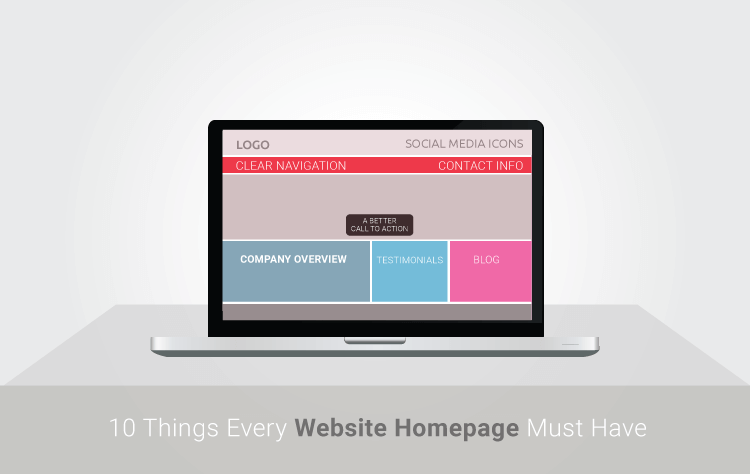
A website homepage should include a headline that states what you do and who it is for, a primary call to action, proof such as reviews and client logos, clear navigation, your core services, contact details and a footer that answers practical questions. Each element should help a first-time visitor decide whether to stay, and what to do next.
These are the twelve essentials, in roughly the order a visitor meets them:
| Element | Why it matters | The mistake I see most |
|---|---|---|
| Brand identifier (logo, name) | Confirms the visitor is in the right place | An oversized logo that pushes the headline below the fold |
| Headline and subheadline | Says what you do, for whom, in plain words | A slogan that could belong to any business |
| One primary call to action | Gives the visitor an obvious next step | Five buttons of equal weight competing for attention |
| Proof | Reviews, client logos, awards and certifications reduce risk | Generic stock testimonials with no names |
| Core services or products | Lets each visitor self-select their path | Listing every service with no hierarchy |
| Benefits, not just features | Explains why what you do matters to the buyer | Paragraphs about the company’s history |
| Clear navigation | Visitors find the page that answers their question | Menu labels written in internal jargon |
| Contact details | Signals you are real and reachable | Phone and email hidden on a separate page only |
| Real images | Shows your people, work and place | Stock photos that make you look like everyone else |
| Content highlights | Blog posts, guides and resources show expertise | A dated feed with inaccurate or irrelevant content |
| Footer | Address, ABN, policies, key links | An empty footer with only a copyright line |
| Fast, mobile-first build | Useful on phones and on the devices your audience actually uses | A heavy hero video that delays everything |
What is the most important element on a homepage?
The most important element on a homepage is the headline, because it decides whether a visitor reads anything else. A good homepage headline states what you do and who it is for in plain language. “WordPress websites for in-house marketing teams” beats “Innovative digital solutions” every time, for people and for AI assistants summarising your business.
Pair the headline with a short explanation and a visually clear primary action. Many visitors arrive on deeper pages or use different screens, so do not rely on everyone seeing the same top block. Keep the route to the next step available as they explore.
The often-cited Lindgaard study concerns rapid judgements of visual appeal. It does not show that a person can read your offer, assess its evidence or decide to buy in 50 milliseconds. Test those questions separately with representative visitors.
How many calls to action should a homepage have?
Give the main audience an obvious primary action, then provide secondary routes that have a real job: services, case studies, support, account access or a guide. The right number depends on the site’s purpose. Visual priority and task completion are more useful checks than an absolute button quota.
Keep button copy short and specific: “Book a free call”, “Request a quote”, “See our work”. Repeat the primary action after each major section so a visitor never has to scroll back up to act. More buttons rarely mean more conversions. They usually mean more hesitation.
Why does proof belong on the homepage?
Proof belongs on the homepage because buyers trust other buyers more than they trust your claims. BrightLocal’s 2026 survey of US consumers found 97% read online reviews when researching local businesses. Named testimonials, review ratings, client logos, awards and certifications all reduce the risk a first-time visitor feels before they contact you.
Use specific proof. A named client, their role and one concrete outcome beats five anonymous five-star quotes. Source: BrightLocal Local Consumer Review Survey 2026 (US panel of 1,002 consumers).
My homepage uses 20+ years building on the web,1,200+ businesses served by WP Creative and 100+ five-star Google reviews as checkable track-record claims. They still need context: the work, reviews and people behind them matter more than a number on its own.
What navigation does a business homepage need?
Use a short primary menu built around the main visitor tasks, with secondary links in the footer and search when it helps people find a larger content collection. Five to seven items can be a starting point, not a limit that every business must obey. Test whether people understand the labels and reach the right answer.
From my older “must-have elements of business websites” post, the navigation building blocks still hold:
- Top navigation for the main sections a buyer needs: services, work, about, insights, contact.
- Footer links for everything secondary: policies, careers, locations, partner pages.
- Site search on any site with more than a few dozen pages.
- Breadcrumbs on deep sites, so visitors and search engines understand the structure.
- Useful HTML navigation and an XML sitemap for discovery; neither guarantees every page is crawled or indexed
A messy menu is usually a sign that nobody owns the site’s structure. A while ago my team was asked to help a healthcare organisation whose navigation had become fractured. It was trying to serve business partners, members of the public and patients through the same menu, so every group had to wade through pages meant for someone else. Rather than start with visuals, we planned a sitemap organised by visitor type, one consistent call to action per path, and a style guide so new pages stop being designed one meeting at a time. A homepage can only be as clear as the structure behind it.
What should you decide before designing a homepage?
Before designing a homepage, decide the main purpose of the website, who the primary visitor is, and the single action you want them to take. A site that exists to generate enquiries needs a different homepage from one that sells products online or builds a personal brand. Content, navigation and calls to action all follow from that decision.
The website purposes I still see most often, and what each changes on the homepage:
| Website purpose | Homepage leads with | Primary call to action |
|---|---|---|
| Generate enquiries for services | Who you help and the outcome | Book a call or request a quote |
| Sell products online | Best sellers, categories and offers | Shop now |
| Build a brand or personal profile | Point of view, proof and content | Read, subscribe or invite to speak |
| Support existing customers | Help content and account access | Log in or get support |
How do you make a homepage readable by AI assistants?
You make a homepage readable by AI assistants by putting the facts in plain text, structuring them with real headings, and keeping them consistent with the rest of the web. Say what the business is, where it operates and who it serves in a sentence an assistant could quote. Avoid text inside images and claims nobody can verify.
This is the part most homepage checklists still miss. ChatGPT, Gemini, Perplexity and Google’s AI answers increasingly summarise a business before a person ever visits. My practical list:
- A one-sentence description of the business in plain text near the top.
- Organisation details (name, location, contact, ABN) in the footer and in structured data.
- Headings that match the questions buyers ask.
- Descriptive links rather than “learn more” everywhere.
- Consistent facts across your site, Google Business Profile and directory listings.
My guide to an agent-ready website goes deeper on what assistants and agents need. If you want the same on your own site, my team covers it in our WordPress web development work.
What to do next
- Read your homepage headline aloud. If a stranger could not repeat what you do, rewrite it.
- Check whether the primary journey is visually clear without hiding other useful actions.
- Add your strongest named proof within the first two screens.
- Check the page on your phone, on mobile data, and fix anything slow or cut off. My guide to mobile-first design explains how.
- Compare your homepage against the bad website design examples I see most.
- If you want a second pair of eyes, book a free call.
Frequently asked questions
How long should a homepage be?
A homepage should be long enough for its audiences to understand the offer, see relevant proof and choose the next step. There is no required section count. Keep sections that answer a real question, and move detailed service or support information to the right linked page.
Should a homepage have a video?
A homepage can have a video if it explains something faster than text can, such as how a product works or a short founder message. Avoid autoplaying background videos in the hero area. They slow the page, distract from the headline and often hurt mobile performance, which is where most visitors arrive. If you put text over a hero image instead, use a transparent overlay that keeps the headline readable.
Should my blog appear on the homepage?
Feature posts when they help buyers decide and remain accurate. A useful evergreen guide can deserve a place even if it is older; a newer but irrelevant post may not. Label dates honestly and review volatile claims rather than treating a year-old publication date as proof of neglect.
What should be in a website footer?
A website footer should include your business name, address or service area, ABN, phone and email, links to key pages, privacy policy and terms, and social profiles. Visitors scroll to the footer to check you are real. Search engines and AI assistants also use those details to confirm who the business is.
How often should I update my homepage?
Review your homepage at least every quarter and update it whenever your offer, proof or positioning changes. New reviews, recent work and current content keep it credible. Measure before and after each change, because small edits to the headline or call to action can change enquiry numbers more than a full redesign.